 Instagram
Being a top creator is exhausting. You need to chat, post, and be online 24/7. If you sleep, you miss out on money.
Fanvue has solved this problem.
They have launched a powerful new feature called "My AI." This tool lets you create a digital twin. It learns from you. It looks like you. It even sounds like you. This technology is so advanced that many fans often wonder are Fanvue models real when they first interact with a digital twin.
Your AI can chat with fans while you are at the gym. It can sell content while you are on vacation. To help your new twin get noticed by more people, you can use a Fanvue like for like strategy to build up your likes and engagement quickly.
This is not a gimmick. It is the future of the creator economy. With an AI twin working for you, it is easier than ever to earn money and choose your preferred Fanvue payout methods to get paid every week.
This is not a gimmick. It is the future of the creator economy.
In this in-depth tutorial, we will walk you through every step.
- The Look: How to set up your realistic AI Avatar.
- The Sound: How to clone your unique AI Voice.
Ready to duplicate your success? Let’s begin.
Setting Up Your Fanvue AI
Creating your digital twin is easier than you think. You do not need to be a computer genius. You just need to tell the system who you are.
The setup is split into two parts: AI Personality (how it texts) and AI Voice (how it speaks).
Step 1: Train Your AI Personality (The Text Chatter)
Your AI Personality is the brain of your bot. It handles all the text messages. It needs to know your history, your likes, and your style so it does not sound like a robot.
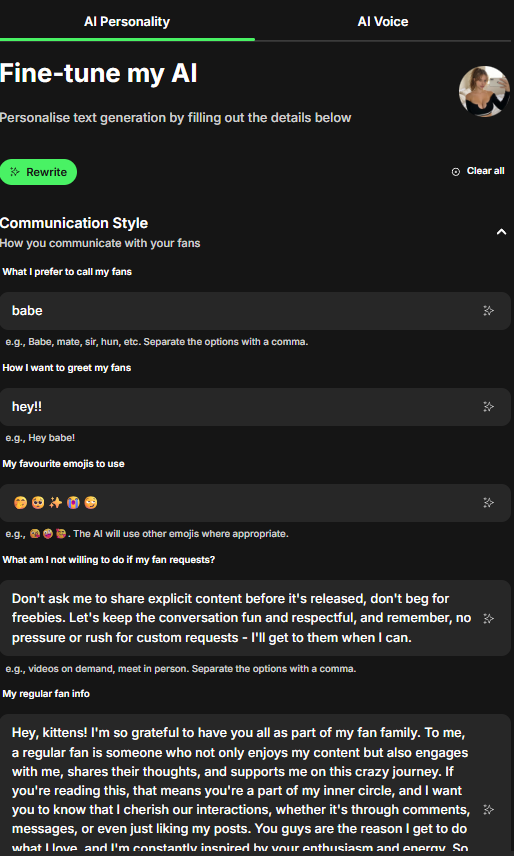
- Go to Settings: Settings>Creator Settings and find the "My AI" tab.
- Select "AI Personality": This is the first step on the progress bar.
- Fill in the 7 Key Fields: You will see a list of questions. You must answer these carefully to make the AI sound like you.
What I prefer to call my fans: Pick a pet name. Do you call them "Babe," "Mate," "Daddy," or "Sir"? Separate your options with commas.

How I want to greet my fans: This is your first impression. Choose a greeting like "Hey babe!" or "What's up handsome?"

My favourite emojis to use: Pick the emojis you use the most (e.g., 😘 😈 🔥). The AI will sprinkle these into conversations naturally.

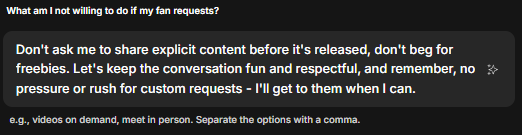
What am I not willing to do?: This is the most important field. You must set boundaries. List things like "meet in person" or "give out my phone number." This stops the AI from promising things you will never do.
My regular fan info: Describe how you treat your subscribers. Are you sweet to them? Do you tease them?
My personality: List your traits. Are you funny, shy, dominant, or the "girl next door"?
My way with words: How do you speak? Do you use slang and short texts? Or do you write long, poetic messages?
Save: Once you save this, the AI will use this "brain" to reply to fans automatically in your DMs.
Pro Tip: Also fill out preferences, and about me (a bit more down)
Step 2: Set Up Your AI Voice (The Voice Notes)
Texting is good. Voice notes are better.
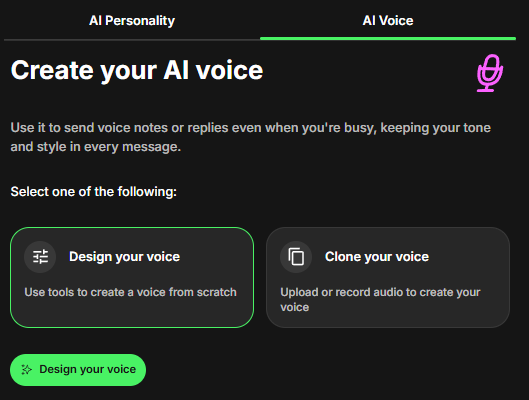
Fanvue allows your AI to send audio messages that sound just like you. This is a game-changer for keeping fans engaged.
- Switch to "AI Voice": Click the next tab in the menu.
- Play around with the settings.
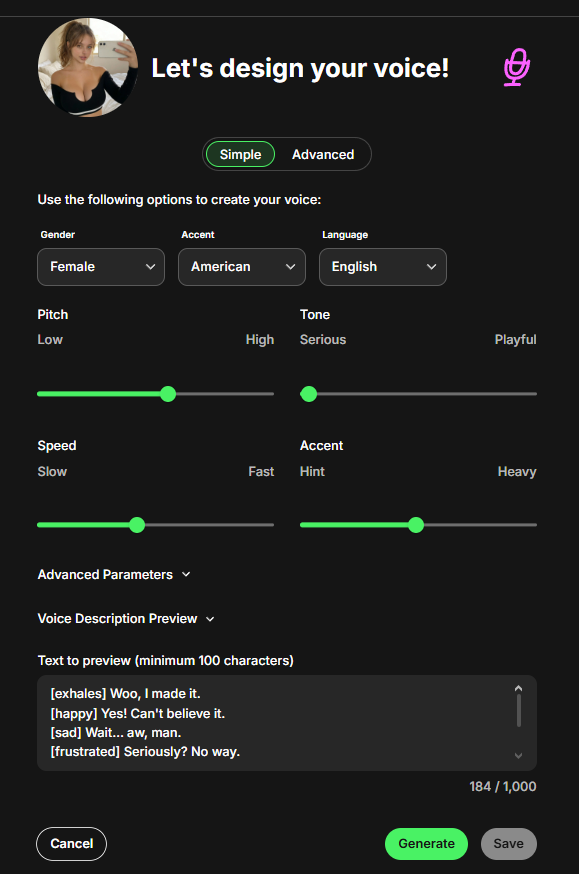
Once this is done, your AI can switch between Texting and Voice Notes seamlessly, making the fan feel like they are talking to the real you.
Join 500+ creators in AI Model Factory – your no-BS Skool playbook for faceless riches.
What's Inside (Proven System):
- IG Growth Hacks: Viral reels with 550k+ views, DM funnels, ban-proof posting.
- AI Images/Videos Mastery: Create stunning influencers in hours using free tools (no Photoshop needed).
- ComfyUI Guide: Step-by-step setup + prompts for consistent, hyper-real models (beginner-friendly).
- Fanvue Guide: Launch, verify AI accounts, PPV pricing, chatting masterclass.
Real students hit $5k week 1
Learn More →
Using Your AI to Chat
You have trained the brain and cloned the voice. Now, it is time to put them to work.
You do not need to open a separate app to use these tools. They are built directly into your Fanvue DM inbox.
Here is how to use them in a real conversation.
1. Generating Text (The Auto-Reply)
Sometimes you do not know what to say. Or maybe you just want to reply faster.
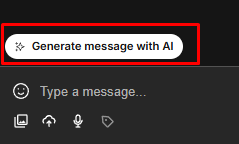
- Open a Chat: Go to your inbox and open a message from a fan.
- The Magic Button: Look for the button that says "Generate message with AI."
- The Result: Click it. The AI will read the fan's previous messages. It will then write a reply for you using the "AI Personality" you set up earlier.
- Edit or Send: You can read the message first. If you like it, hit send. If you want to change a word, you can edit it before sending.
2. Generating Voice Notes (The Clone Speak)
This is the feature that impresses fans the most. You can send a voice note without speaking.
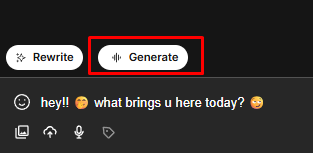
- Type Your Message: Write down what you want to say in the chat box. (Or use the AI to generate the text for you).
- Click "Generate": Look for the audio generation button next to the text. Click "Generate."
- The Transformation: In a few seconds, the system converts your typed words into an audio file.
- The Sound: It will use your "AI Voice" clone. It sounds exactly like you recording a voice note.
- Send: Send the audio clip. The fan will think you took the time to record a personal message just for them.
Conclusion: Work Smarter, Not Harder
Being a top creator is hard work, but you do not have to do it alone. Many people wonder is AI OFM profitable in the long run, and the answer is yes when you use the right tools.
With Fanvue My AI, you finally have a partner.
- It never sleeps.
- It never gets tired.
- It replies instantly to every fan.
You can use the AI Personality to keep the conversation going in your DMs. This is a key part of your AI OFM promotion to keep your fans happy and engaged.
You can use the AI Voice to send personal audio notes that sound exactly like you. This works even when you are making Fanvue NSFW content, but you must be careful to follow all the platform rules. If you ignore the rules or use the tool wrong, you will quickly know if you are banned on Fanvue.
This frees you up. You can spend your time making new content, going to the gym, or getting more Fanvue fans while the AI handles the busy work. You can even spend your time just sleeping!
Stop trying to work 24 hours a day. Clone yourself today and let the technology make money for you.