 Instagram
You made a beautiful AI girl for Instagram.
She looks real. Fans love her posts.
But some ask: “Is this a real person or AI?” The question of whether are Fanvue models real is a common one. Others copy your pictures.
The blue checkmark (Meta Verified) fixes this. It shows people your account is real and safe. It's one of the best promotion methods.
Fans trust you more. They subscribe faster, which means you can start using Fanvue payout methods to cash out weekly. It also stops copycats.
Many think any AI model can get the blue check. The truth in 2025 is different.
The blue Meta Verified checkmark fixes both – instant trust + protection from thieves.
It boosts conversions 2–5X and stops imposters cold. To quickly grow your subscriber base even without the tick, many creators rely on strategies like Fanvue like for like systems.
Stay anonymous, stay safe, and still grow to $30k–$100k+/month, understanding that optimizing your Fanvue payout methods is crucial for scaling your earnings safely.
Let’s clear the confusion – right now.
1. Switch to "Business" Account First
You cannot get the blue check if your account is normal or "Creator" type.
Meta has special rules for AI or virtual models.
Step by step – easy to do
- Open Instagram app or website.
- Go to your profile.
- Tap the three lines (menu).
- Choose Settings → Account → Switch to Professional Account.
- Pick "Digital Creator", and NEVER check "Show on profile" (prevents bans)
- When it asks type, choose Business – NOT Creator.
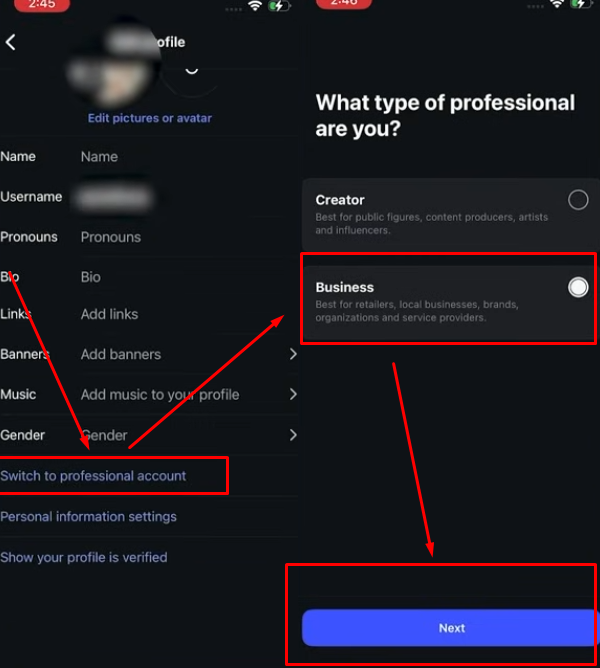
Why "Business" and not "Creator"
- "Creator" type asks for your real face video and ID.
Bad for anonymous AI – you cannot hide. - "Business" type lets you use any picture (your AI girl).
You can use any name.
No real face needed.
This change is free and fast.
Do it first.
After this, you can try for the blue check or use other ways to look trusted.
Business account also gives you stats – see how many people look at your posts.
Do this today.
Your AI girl needs a business home to grow big.
2. Passing the Verification Gate: Building Trust First
Meta does not give the blue check to new or suspicious accounts.
If you try to buy Meta Verified and see “join the wait list,” it means Meta does not trust your account yet.
You must build trust before the buy button appears.
How to build trust fast
- Grow to at least 1,000 followers Many creators see the verification option open around 1,000 real followers. Post daily Reels, use good hashtags, and engage with comments to build the trust needed for getting your first sub on Fanvue.
- Keep your account clean No shadowbans, no strikes, no suspensions. Follow Instagram rules: no spam, no fake engagement, no banned content. If your account is new, wait a few weeks and post normal content first so you never have to know if you are banned on Fanvue.
- Be active every day Post stories, Reels, and pictures regularly. Reply to comments. Instagram likes active accounts. Many beginners wonder is AI OFM profitable, and the answer is yes if you stay active and talk to your fans daily.
How to buy when it opens
- Go to your profile.
- Tap the three lines → Settings → Account Center.
- Scroll down → find Meta Verified.
- Choose the cheapest plan (usually enough).
- Pay → wait for approval.
Do these steps and the option will appear soon.
Build real followers and stay clean – trust comes fast.
Your blue check is closer than you think.
3. The Identity Match – Using Your Real Last Name Trick
Meta will ask you to prove who you are.
They want ID or business number.
Pure AI has no ID.
So you use your own real ID – the human behind the AI.
The most common way: Use your real last name (safe trick)
This is how many creators get the blue check for their AI girl.
- Change the name for a short time
Add your real last name to the AI girl's profile name.
Example: If your real name is John Smith, change to “Mia Smith”. - Upload your real ID
Choose “verify with ID”.
Take clear picture of your passport or driver's license.
Meta checks the last name matches. - Wait for approval
It takes a few days to 2 weeks.
Keep the last name during this time. - Change name back after some weeks
Once you have the blue check, after a couple of weeks change back to “Mia” or whatever you want.
The check stays (usually).

This works because Meta only checks the last name match at the moment of verification.
It is the safest way for AI creators who want the blue tick without showing face.
Many do this and keep the check for months.
Do it carefully.
Follow rules.
Your blue check comes soon.
Bonus Method: Using a Business Document – No Personal Name Needed
If you have a real business for your AI model, this is the best way.
No need to use your personal name or face.
How it works
- Register a small business in your country (easy and cheap in many places).
Example: LLC, sole trader, or company. - Get the official business number (Chamber of Commerce or similar).
- Get the business document (certificate or registration paper).
Step by step
- When Meta asks for verification, choose “business” option.
- Upload your business document.
- Enter the business number.
- Wait for approval (few days to 2 weeks).
Why it is good
- No personal ID.
- No real name match needed.
- Keep full anonymity.
- Blue check goes to the business account running the AI girl.
Many AI creators use this method in 2025.
It works well and is safe.
If you can register a business, do this.
It is the cleanest way for anonymous AI models to get the blue check.
Your privacy stays safe.
Your account looks trusted.
Fans subscribe faster.
Try this if you want the check without risk.

Join 500+ creators in AI Model Factory – your no-BS Skool playbook for faceless riches.
What's Inside (Proven System):
- IG Growth Hacks: Viral reels with 550k+ views, DM funnels, ban-proof posting.
- AI Images/Videos Mastery: Create stunning influencers in hours using free tools (no Photoshop needed).
- ComfyUI Guide: Step-by-step setup + prompts for consistent, hyper-real models (beginner-friendly).
- Fanvue Guide: Launch, verify AI accounts, PPV pricing, chatting masterclass.
Real students hit $5k week 1
Learn More →
Conclusion
The business of AI models is booming, proving that is AI OFM profitable for many creators. But some ask: “Is this a real person or AI?” Others copy your pictures.
The blue checkmark (Meta Verified) fixes this. It shows fans your AI model is real and serious.
This trust signal is great for getting more Fanvue fans. It stops copycats fast. Fans trust you more and subscribe quicker.
But Meta Verified (the blue checkmark you pay for) is made for real people and real businesses only. The rules are strict.
If you break them, you could get flagged, similar to situations where creators need to know if you are banned on Fanvue. You must follow the rules, especially when making Fanvue NSFW content.
To get the blue tick, change your profile to a Business account. You can use your real last name for a short time with your ID. This works for some creators.
But be very careful:
- If you have many accounts, keep them separate (different phone, email, internet).
- Meta can flag mistakes hard – false bans happen. If subscribers see your account disappear due to a ban, they might start unsubscribing from Fanvue.
The blue check helps a lot, but it is not everything. Many top AI models grow big without it, focusing instead on strong AI OFM promotion across social media.
Use verification if you can do it safe. Always follow the rules. Your AI business can win either way.
Stay smart. Stay safe. Grow strong. Your success is in your hands.