 Instagram
I decided to do a deep dive into how the Fanvue payment system actually works. I spent hours reading through their official terms, digging into frustrated Reddit threads, and scrolling through Trustpilot reviews. What I found honestly shocked me.
If you are thinking about starting an account, you need to read my complete Fanvue payout review. Here is everything I just discovered about the hidden rules, the strict security checks, and why so many creators are suddenly losing their money.
The Basics: How Payouts Are Supposed to Work
Let me start with how the system is supposed to function on paper. When a fan pays you for a subscription, a tip, or a pay-per-view (PPV) message, that money does not go straight to your bank. It goes into a "Pending Balance".
Fanvue holds this money for 7 days to process the funds and take their platform fee (which is 15% for your first three months, and then 20% after that). Once those 7 days pass, the money moves into your "Available Balance."
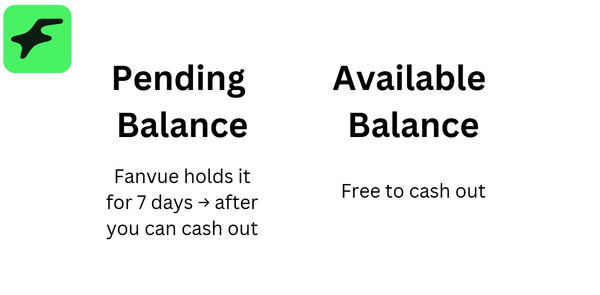
At this point, as long as you have a minimum of $20 in your account, you can request a withdrawal. Fanvue officially states that payouts are processed and sent to your bank or crypto wallet within 3 to 7 business days.
Sounds super fast and easy, right? Well, keep reading. This is where I discovered the dark side of the platform.
The First Payout Trap: The Full KYC & Guideline Check
Here is the biggest thing I learned, and it is something almost nobody talks about until it is too late. They do a massive, deep-dive check on your very first payout.
When you hit that withdraw button for the very first time, Fanvue does not just automatically send you the money. Instead, they freeze the transaction and put your account under a routine fraud check.
You might not get paid if:
- your character looks young,
- content is from Google,
- you have minor-related things (e.g., teddy bears, Hello Kitty, etc...)
During this first payout review, they do a full check of your KYC (Know Your Customer) identity documents. The banking details you entered must exactly match the name of the person who completed the original ID verification. If you signed up with your real ID, but try to send the money to a friend's bank account or a business account with a different name, the payout will be instantly blocked.
But it goes deeper than just your ID. During this first payout request, their moderation team will do a full sweep of your account to see if you broke any guidelines. They will look at the photos and videos you posted. If they find anything that violates their rules—even a tiny mistake—your money gets frozen, and your account can be suspended.
The "Suspicious Activity" Freeze (Why You Might Not Get Paid)
Even after you pass your first payout, you are never truly safe. I discovered that Fanvue will freeze your payouts again if you have done something suspicious.
What counts as suspicious?
- Sudden Spikes in Income: If you suddenly earn more than $100 in a single 24-hour period as a new creator, it triggers a manual review.
- Large Withdrawals: Many creators on Reddit mentioned that anytime they try to withdraw a large sum of money (like $800 or $2,000), Fanvue slaps a hold on their funds for an "account review".
- Unverified Buyers: If a fan buys your content but hasn't verified their email address, Fanvue will hold that specific payment for up to 30 days to prevent chargebacks.
- Off-Platform Sales: If you try to sell something through Fanvue DMs but ask the fan to pay you on PayPal or CashApp, they will catch you. Doing this leads to immediate account suspension and withheld payouts.
If their system flags your account for suspicious activity, this can result in you not getting paid at all. I read countless reviews from creators who had thousands of dollars in their available balance, only to have Fanvue close their account and keep the money.
The Two Biggest Mistakes That Will Cost You Your Earnings
As I continued my research for this Fanvue payout review, I noticed two specific rules that trip up almost everyone. If you break these, you will not get your money.
1. The AI Disclosure Rule
Because Fanvue allows AI-generated models, a lot of people try to trick fans into thinking the model is a real human. Do not do this! If you upload AI-generated media, it is non-negotiable that you disclose it. You must put a clear warning in your bio, in your captions, or use a watermark stating the content is AI. If you try to hide deepfakes or trick people, and Fanvue catches you during a payout review, they will permanently suspend you and keep your earnings.
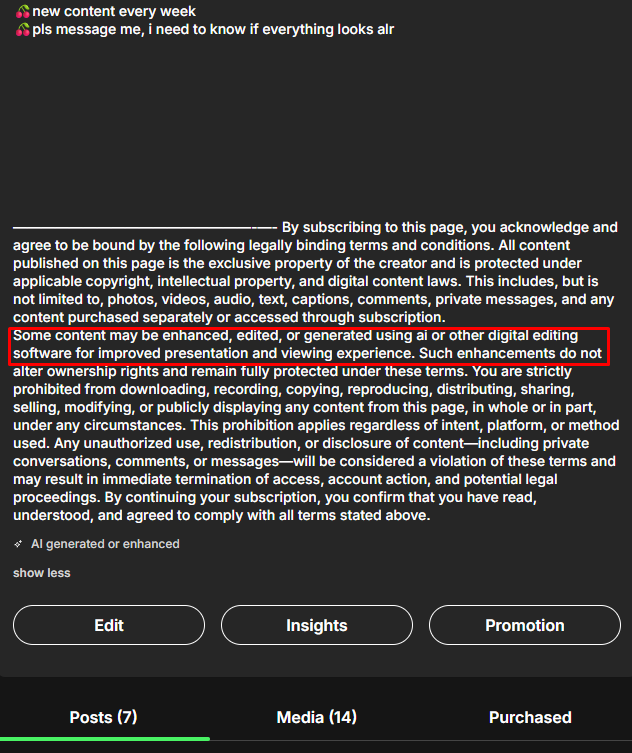
Some content may be enhanced, edited, or generated using ai or other digital editing software for improved presentation and viewing experience. Such enhancements do not alter ownership rights and remain fully protected under these terms. You are strictly prohibited from downloading, recording, copying, reproducing, distributing, sharing, selling, modifying, or publicly displaying any content from this page, in whole or in part, under any circumstances. This prohibition applies regardless of intent, platform, or method used. Any unauthorized use, redistribution, or disclosure of content—including private conversations, comments, or messages—will be considered a violation of these terms and may result in immediate termination of access, account action, and potential legal proceedings. By continuing your subscription, you confirm that you have read, understood, and agreed to comply with all terms stated above.
2. The Co-Creator Consent Trap
This one is huge. If you post a photo or video that features another person—even if it is just their body and an AI face is swapped over it—you must have legal documentation for that person. You have to submit a completed Model Release Form, a photo of their government ID, a full-body shot, and a picture of them holding a piece of paper with the date.
I read horror stories from creators who had $3,000 frozen because Fanvue suddenly demanded paperwork for old co-stars. Even when the creator offered to delete the old photos, Fanvue said it didn't matter and kept the money as a "safety net" for potential fan refunds.
My Final Thoughts: Is It Worth The Risk?
Writing this Fanvue payout review has been a massive eye-opener for me.
On one hand, the platform is incredibly innovative. They allow AI content, they give you an 85% cut in your first few months, and they have built-in AI chatbots to help you sell content. This makes many people wonder is AI OnlyFans legit, and the answer is yes, especially since the platform fully supports digital models. If everything goes smoothly, getting paid in just 7 days is amazing.
But on the other hand, the payout process feels like walking through a minefield, which pushes some frustrated users to look for the best Fanvue alternatives to avoid these strict rules.
If you are going to use this platform, you have to treat their rules like absolute law. You cannot cut corners when you become Fanvue creator and start building your brand.
- You must make sure your bank account name matches your KYC ID perfectly. This is also important so you understand how Fanvue appears on the bank statement for your own privacy and records.
- You must clearly disclose if your model is AI-generated.
- You must never post content with another person unless you have their ID and a signed Model Release Form.
- You must avoid anything that could even slightly look like underage roleplay (no school outfits, no teddy bears, no "young" AI prompts).
They are watching your account, especially during that first payout and whenever you do something suspicious. If you play completely by the rules and follow the best Fanvue tips for top earners, you can make a lot of money here. But if you try to cheat the system, do not be surprised when your payout gets blocked and your money disappears!