Instagram

You built your AI model, posted 100+ photos, and watched subscribers roll in. Now the real question: How do you get that $10k–$50k to your bank without delays or hidden fees?
Fanvue makes payouts simple and modern in 2026– no waiting 30 days like some old platforms. They offer bank transfers, eWallets, and crypto, with weekly processing and 85% take-home your first month (80% after). The Fanvue creator payout percentage in 2026 is 15% for your first month, and 20% the next months.
But it is not instant. You need $20 minimum (varies by region), 5+ pieces of content so the team can confirm if you have full verification. First payout triggers a quick fraud check (3–7 days).
This guide covers every method, exact fees, steps, and tips to cash out $5k+ per week without issues, which is easier if you use Fanvue like for like strategies to grow faster. Whether you want fast fanvue crypto payouts or stable bank wires, get paid your way – starting today.

Prerequisites – The “Before You Withdraw” Checklist
Fanvue will not pay you instantly. They use three simple anti-fraud rules.
Meet all three and payouts unlock. Miss one and you are stuck at $0 forever.
Here is exactly what you need in 2026:
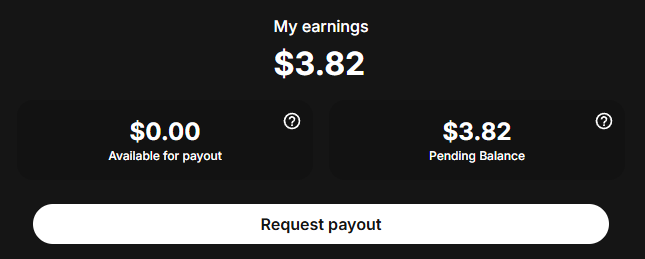
A) Reach the Fanvue minimum payout
- $20 USD in your “Available for payout” section (not just total earnings)
- Some countries have $50 minimum – check your dashboard
- Tip: Request the second you hit $100 so you never risk big money on the first review
B) Upload at least 5 pieces of content
- Photos, videos, or posts – anything counts
- Empty profiles or “coming soon” pages get blocked automatically. Good Fanvue profiles get accepted 80% of the time.
- Pro move: Upload 50–100 pieces right after verification so you never worry about this rule again
C) Verify every person who appears in your content
- If another real human shows up (even a hand), they must submit ID as co-creator
- AI-only content = no extra verification needed
- Unverified co-creators = all earnings frozen until fixed
Do these three things the same day you get approved and your fanvue payout speed will be blazingly fast.
1. Available Withdrawal Methods on Fanvue
Fanvue gives you real flexibility based on your country – no PayPal, but bank, eWallets, and crypto cover almost everyone who wants to become Fanvue creator.
All methods require full Fanvue KYC verification first (ID + selfie), which is also required to get the Fanvue verified badge. The Fanvue payout speed is 3–7 business days (first payout 7–10 days for fraud check).
Here is every option, how it works, and fees (updated from Fanvue's 2026 help center) to help you learn how to use Fanvue.
A) Direct Bank Transfer (SEPA/SWIFT/ACH – Best for US/EU/AU Creators)
Universal method for direct deposits to your bank. No eWallet needed, making it easy to manage multiple Fanvue accounts.
- How it works:
- Go to Settings > Payout Settings > Add Method > Bank Transfer.
- Enter details:
- USA: Account + Routing Number
- Europe: IBAN + BIC/SWIFT + Sort Code
- Canada: Institution + Branch + Account Number
- Australia: Account + BSB + SWIFT
- International: Full SWIFT/IBAN details
- Request from Earnings page → funds arrive in 3–7 days
- Minimum: $20 (higher in some regions, e.g., $50).
- Fees:
- Fanvue: $0
- Bank: Domestic $0–$10; International $20–$40 (your bank’s wire fee).
- Best for: Stable, hands-free payouts
B) MassPay eWallet (Global Hub – Crypto + Bank Flexibility)
MassPay is Fanvue’s top partner for 100+ countries, proving the platform pays out when people ask is Fanvue legit. Withdraw to eWallet, then cash out however you want.
- How it works:
- Add in Payout Settings > eWallet > MassPay.
- Verify wallet (quick ID if needed) similar to how you verify Fanvue account.
- Request payout → hits MassPay in 1–3 days.
- From MassPay: Bank transfer, prepaid card, debit load, or crypto (BTC/ETH/USDT), offering more flexibility than many Fanvue alternatives.
- Fanvue Minimum Payout: $20 (regional variations possible).
- Fees:
- Fanvue: $0
- MassPay: $1–$5 flat (e.g., $1 for crypto, $3–$5 for bank).
- Best for: International creators or crypto fans. One Reddit user: "Fanvue to MassPay in 1 hour, then Binance to bank – no fees."
C) Cosmo eWallet (Alternative for Tough Regions)
Similar to MassPay but better for areas with bank restrictions where you might want to create AI model for Fanvue. Great for Asia/Latin America.
- How it works:
- Add in Payout Settings > eWallet > Cosmo.
- Verify and link.
- Request → funds in 1–3 days.
- Withdraw to bank, card, or crypto from Cosmo app
- Minimum: $20 (check regionally).
- Fees:
- Fanvue: $0
- Cosmo: $1–$4 (varies by method/location).
- Best for: Creators in non-SEPA countries. Low fees, fast setup.
Pro tip: Start with eWallet for testing ($20 pull), then switch to bank for big $5k+ payouts. All methods support USD; crypto avoids currency conversion fees.
2. Fanvue Fees and Commission Structure
Fanvue's cut comes off the top – before any payout fees. It is straightforward, but understanding it helps you price subscriptions and PPVs right for max take-home.

A) Standard Commission
- Fanvue payout percentage: 20% of your gross earnings (subscriptions, tips, PPV). You keep 80%. Example: $100 sub → $80 in your balance.
B) New Creator Bonus
- First 30 days: Reduced to 15% commission. You keep 85% (extra 5% incentive to start strong). After: Back to 20% (80% yours). This applies automatically – no code needed.
C) Other Built-In Deductions
- Refunds/chargebacks: Deducted from your balance (up to 1.5% dispute rate OK; over that = $50 fee per extra). It is smart to learn how Fanvue refund works so you can manage your money and avoid these extra fees.
- Taxes: You handle your own (Fanvue reports earnings; set aside 20–30%).
- No hidden platform fees beyond commission. Many new creators ask is AI OFM profitable because of these costs, and the answer is yes because the expenses stay very low.
Pro tip: Price subs at $10–$20 to offset the 20% – after bonus, you net $8.50–$17 first month. Track in dashboard. Setting a fair price like this is the best way of getting your first sub on Fanvue and growing your income fast.
3. What is the Fanvue payout speed?
A) Standard Processing Time
- 3–7 business days from request to funds in your account (method-dependent).
- Bank: 3–5 days domestic (UK), 5–7 international.
- eWallets (MassPay/Cosmo), usually Asia & Latin America: 1–3 days.
- Crypto: 1–3 days to wallet (instant after). Using crypto is a popular choice for creators engaging in AI OFM promotion.
2. First-Time Withdrawals
- Extra 2–3 days (total 7–10 days) for routine fraud review. Upload 5+ content pieces early to speed it up. This initial waiting period is a small factor creators consider when assessing how fast they can start getting more Fanvue fans and earning. No issues after first—weekly requests process normally.
Critical safety note: Bank name must match your KYC ID exactly. Wrong details = rejected payout (no recovery). Double-check before requesting and ensure your content, particularly any making Fanvue NSFW content, is compliant so you never need to know if you are banned on Fanvue.
Request Fridays for Monday–Wednesday arrival. Track in Earnings > Payout History.
Timely payouts are important for maintaining an active presence on the platform and preventing users from unsubscribing from Fanvue due to lack of creator activity.

Join 500+ creators in AI Model Factory – your no-BS Skool playbook for faceless riches.
What's Inside (Proven System):
- IG Growth Hacks: Viral reels with 550k+ views, DM funnels, ban-proof posting.
- AI Images/Videos Mastery: Create stunning influencers in hours using free tools (no Photoshop needed).
- ComfyUI Guide: Step-by-step setup + prompts for consistent, hyper-real models (beginner-friendly).
- Fanvue Guide: Launch, verify AI accounts, PPV pricing, chatting masterclass.
Real students hit $5k week 1
Learn More →
Conclusion
Fanvue pays faster and cleaner than any other similar platforms in 2026.
Hit $20 + 5 posts → choose bank (3–7 days), eWallet ($1–$5 fee), or crypto (under $5) → request weekly → money lands every time.
First payout takes 7–10 days (fraud check), every one after is 3–7 days max.
Keep 85% your first month, 80% after, and never send to a mismatched bank name.
Set up your method today, request at $100, and watch real money hit your account this week.
Your subscribers already paid. Now go collect.