
 Instagram
You subscribed to a creator on Fanvue and now want out.
Perhaps you started wondering are Fanvue models real and felt disconnected. How to unsubscribe on Fanvue?
Good news: unsubscribing is fast and permanent – no tricks, no hidden buttons. Bad news:
Fanvue almost never gives refunds, and the charge for the current month stays. Once the money enters the pipeline for Fanvue payout methods, it is usually gone for good.

Whether you want to cancel one creator who annoyed you with Fanvue like for like spam, stop all subscriptions, or delete your entire account, this guide shows you exactly how – on mobile, desktop, and even if the creator blocked you.
Follow these steps and the recurring billing stops instantly. No more surprise charges.
Let’s get you unsubscribed right now.
1. How to Unsubscribe on Fanvue (30 seconds)
This is the most common need – stop one creator without touching the rest.
On Mobile App (iOS/Android)
- Open Fanvue → tap Subscriptions (bottom bar, heart + person icon)
- Scroll or search for the creator → tap their name
- Tap the big “Subscribed” button → choose “Unsubscribe”
- Confirm → renewal cancelled instantly
You keep access until your current paid period ends.
On Desktop / Browser
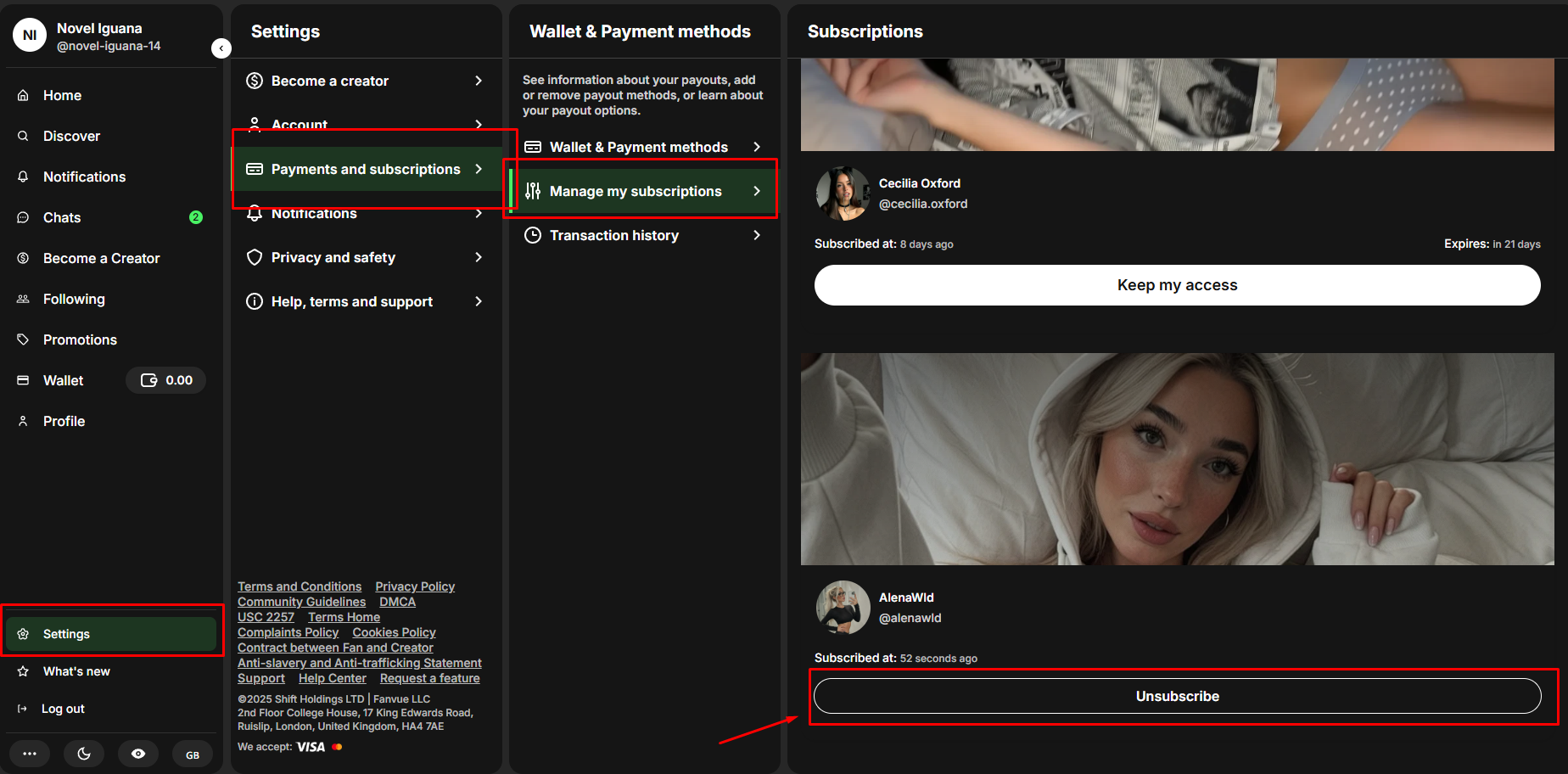
- Log in → click Subscriptions (left sidebar or top menu)
- Find the creator → click “Manage Subscription”
- Click “Cancel Subscription” → confirm
- Done – no future charges, access stays until billing date
Takes under 30 seconds once you’re in the list.
2. How to Unsubscribe from Fanvue on ALL Subscriptions at Once (Clean Slate in 5 Minutes)
Fanvue has no “cancel all” button, but here’s the fastest way:
- Go to Subscriptions page (mobile or desktop)
- Sort by “Most Expensive” or “Renewal Date Soonest”
- Open each creator → “Unsubscribe” → confirm (10–20 creators = 3–5 minutes total)
This process is what creators who focus on AI OFM promotion try to avoid, by making sure their content is compelling.
Pro tip: Screenshot your full list first – you can resubscribe later with one tap.
All subscriptions stop renewing instantly. You keep access to each until its current period ends.
This process is crucial for people managing their budgets.
If you are a creator experiencing issues that might lead to user cancellation, ensure you address any potential rule violations quickly so you don't know if you are banned on Fanvue.
3. How to Delete Your Fanvue Account Completely (Permanent Nuclear Option)
Want to wipe everything – subscriptions, messages, payment info, and history – forever? This ensures total privacy regarding how Fanvue appears on the bank statement moving forward.
Here’s the exact process in 2025:
On Mobile or Desktop
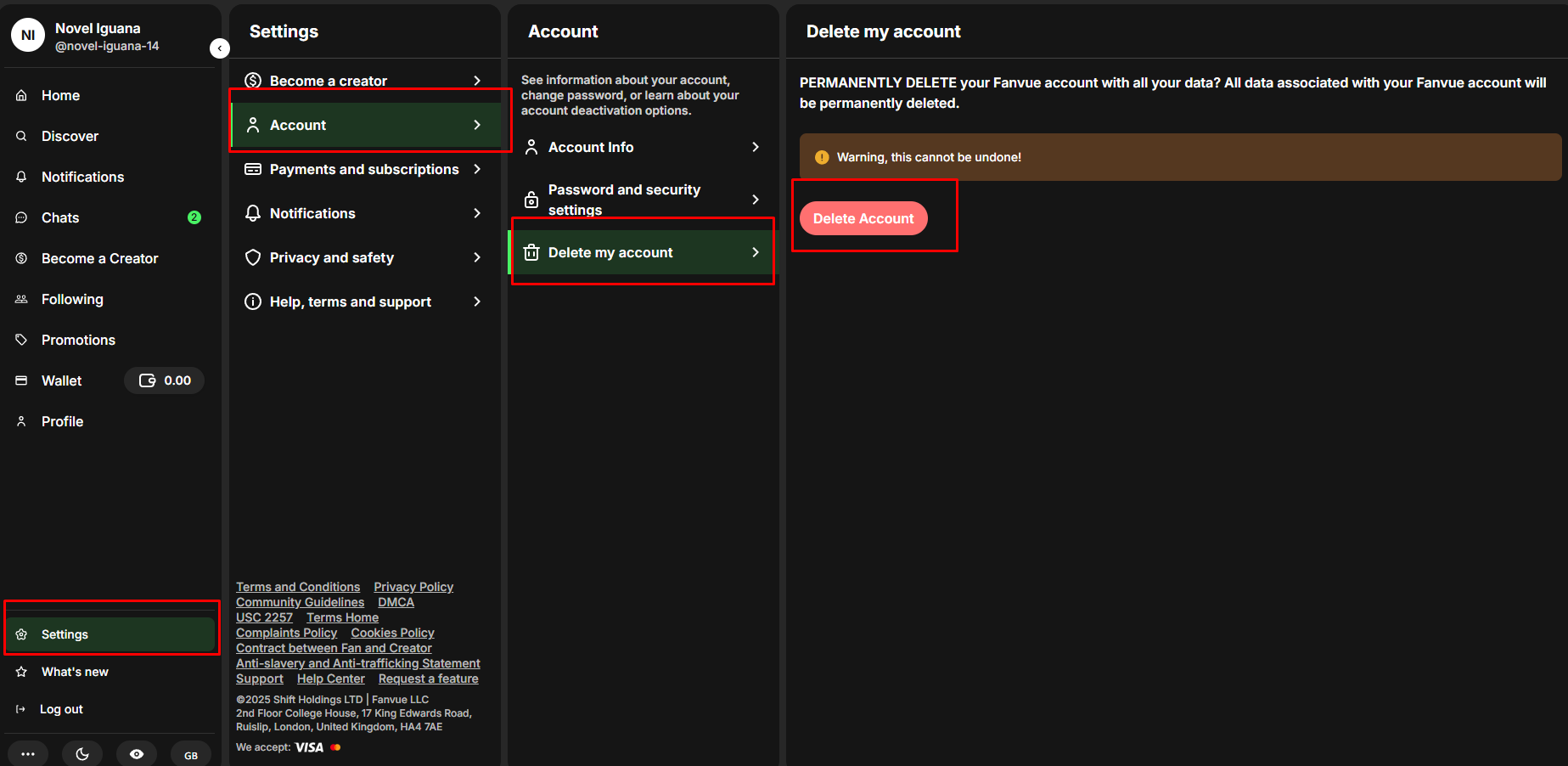
- Open Fanvue → tap/click your profile icon (bottom right or top right)
- Go to Settings → Account (scroll down past the Fanvue verified badge section)
- Find “Delete My Account” (usually red text at the bottom)
- Type your password + confirm reason (optional)
- Hit “Delete” → final confirmation pop-up → confirm again
Done. Your account is scheduled for permanent deletion.
What Actually Happens
- All active subscriptions cancel automatically
- You lose access instantly (some see 30-day grace period – rare), even if you manage multiple Fanvue accounts linked to this login
- Messages, content, and payment history gone forever
- Email linked to account can’t be reused if you decide to become Fanvue creator again later
Warning: This is 100% permanent. No recovery after 24–48 hours. This deletes your potential to become Fanvue Ambassador. If you just want to stop charges, cancel subscriptions instead.
4. Privacy Note: Stop “fanvue.com” Showing on Your Bank Statement (Free & Instant)
Worried your partner, parents, or bank will see “fanvue.com” on statements?
Fanvue gives you a free fix – no need to cancel everything.

More on discreet billing.
Default vs Discrete Billing
- Default: Every charge shows as “fanvue.com $9.99” – easy to google and spot.
- Discrete Billing: Switch once → all charges become “SHL 1234-567890” (random neutral code) – impossible to trace.
How to turn it on in 30 seconds
- Open Fanvue → Settings → Wallet / Billing
- Find “Discrete Billing” → toggle ON
- Save → applies to all future charges instantly. This is the best way to keep your activity private while knowing how Fanvue Discovery works to find your favorite new creators.
100% free. Works for subscriptions, tips, PPV – everything. You can use this private payment method to see how Fanvue My AI works when you want to chat with a model.
Extra privacy tip: Pay with crypto (USDT/BTC) or virtual cards (Privacy.com/Revolut) → zero trace on bank statements. Keeping your spending hidden from the start is much safer than having to learn how Fanvue refund works after a mistake shows up on your bill.
Fix the privacy issue first – then decide if you still want to cancel. Toggle Discrete Billing now and keep enjoying worry-free.

Join 500+ creators in AI Model Factory – your no-BS Skool playbook for faceless riches.
What's Inside (Proven System):
- IG Growth Hacks: Viral reels with 550k+ views, DM funnels, ban-proof posting.
- AI Images/Videos Mastery: Create stunning influencers in hours using free tools (no Photoshop needed).
- ComfyUI Guide: Step-by-step setup + prompts for consistent, hyper-real models (beginner-friendly).
- Fanvue Guide: Launch, verify AI accounts, PPV pricing, chatting masterclass.
Real students hit $5k week 1
Learn More →
Conclusion
Unsubscribing from Fanvue is fast, permanent, and completely in your hands.
- Want to stop one creator? Maybe they just spam to get Fanvue likes instead of posting real content → open Subscriptions → tap Unsubscribe → done.
- Want to stop all? Perhaps you are moving on to better Fanvue alternatives → cancel them one by one → no more charges ever.
- Want to disappear forever? If you don't want to verify Fanvue account ID documents → Settings → Delete Account → everything wiped.
Turn on Discrete Billing if privacy is the real issue – so “fanvue.com” disappears from your statement today.
Follow these simple Fanvue tips to ensure a clean break. No more surprises. No more stress.
Take 60 seconds right now. Whether you are leaving for good or planning to create AI model for Fanvue yourself in the future, cancel what you don’t want and enjoy the peace of mind.
You’re in control. Close the app and move on with your day. 💰